<?xml version="1.0" encoding="utf-8"?>
<feed xmlns="http://www.w3.org/2005/Atom">
<title>JHHM's Writings</title>
<author><name>JHHM</name></author>
<link rel="self" type="application/atom+xml" href="https://jhhm.no/writings/atom.xml"/>
<link href="https://jhhm.no/writings/"/>
<id>https://jhhm.no/writings/</id>
<updated>2026-05-02T05:45:58Z</updated>
<entry>
<title>Stop Secretly Translating the Web</title>
<id>https://jhhm.no/writings/stop-automatic-translation</id>
<link rel="alternate" href="https://jhhm.no/writings/stop-automatic-translation"/>
<published>2026-04-30T06:53:35Z</published>
<updated>2026-04-30T06:53:35Z</updated>
<content type="html"><![CDATA[<h1>Stop Secretly Translating the Web</h1>
<p>I have been anxiously tracking a UPS package for the past two weeks. To make a long story short, I have been waiting for a package to clear customs and escape UPS warehouse hell, all while trying to fix its delivery address, so I don't have to travel from Trondheim to Stavanger to pick it up. When the tracker started updating with the same information every day, "Warehouse scan, Oslo Norway", I started worrying if there was something wrong.</p>
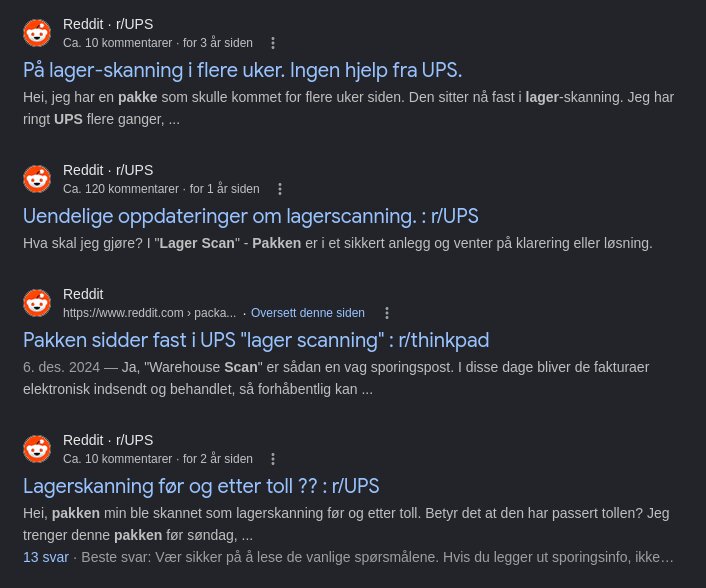
<p>So, I did what most people do when they want to find some (hopefully) real human made content on the web,<sup id="fnref-1"><a href="#fn-1">1</a></sup> and searched for "UPS på lager reddit".<sup id="fnref-2"><a href="#fn-2">2</a></sup> The results seemed promising, plenty of people with the same experience as me, also people from Norway. I wonder how long their packages were stuck in Oslo. Does it mean they are clearing it with customs? Would calling customer service result in any of my questions being answered?</p>
<figure><img src="/img/ups-search.jpg" alt="ups search results"><figcaption>Dramatic reenactment of search results encountered that day.</figcaption></figure>
<p>I start reading a post, but after a minute of reading I start noticing signs that I just got epically pranked. One person talking about their packages always getting stuck at the Louisville terminal, another explaining how their packages always get delivered the same day or the next day if it's not "from out of state". I look at the URL to confirm my suspicions. I'm on the UPS subreddit, being served a page fully translated from English to Norwegian. Search result snippet, title, post, and comments, all automatically translated.</p>
<p>This has been a grievance of mine for some time now. I get served automatically translated YouTube titles, Reddit posts, SEO slop websites, even YouTube videos get automatic machine translated audio tracks. These translations are always annoying, but they are especially frustrating whenever I am trying to find information that is specifically Norwegian. If you are from the US you probably don't have to think about it often, but the default assumption that us foreigners have to make is that most content on the web is US-specific. This can be annoying, but it's also understandable and predictable. I have navigated the internet with this knowledge my whole life, and if I ever needed to access some Norway-specific information, I would just search for it in Norwegian.</p>
<p>But, this rubric no longer works as it used to. Now you have to be on the lookout for sites luring you into clicking their automatically translated posts. Reddit is a big offender of this. I expect most websites that pop up from a search to be LLM generated garbage, so who cares if they also translate it, but there is something about translating user-submitted content on a forum site feels especially gross.</p>
<p>I don't dislike translation of content on the internet. In fact, I often use it to access information in languages that I don't read, be it a French article, or a Chinese forum post. I can also imagine that it is a necessity for people browsing the web that don't know English. What I don't like is when it is done without asking me, especially when there is no clear way of telling that it is translated!</p>
<figure><img src="/img/ups-reddit-page.jpg" alt="reddit page"><figcaption>With all of the useless clutter on this page, can you really expect a user to notice the small banner saying the page has been translated? Everything other than the post and comments gets tuned out anyways, since those are the only parts I care about. And once you start scrolling, the notice disappears completely, leaving no trace that the page was ever translated.</figcaption></figure>
<p>Theoretically, both Reddit and YouTube allow you to disable their automatic translation dis-service.<sup id="fnref-3"><a href="#fn-3">3</a></sup> That is until they randomly reset your preference, change its location / implementation, or simply remove it in the future. If the web was a nice place, all of this would be handled at the browser level, where each person could decide when and what to translate. Most browsers can already do this today, and Google Translate has been able to translate websites for over 20 years. But, the great minds in Silicon Valley have also decided to build it directly into their websites,<sup id="fnref-4"><a href="#fn-4">4</a></sup> in the most annoying way possible. Hopefully all of this will get better eventually, but I’m not holding my breath.</p>
<ol class="footnotes">
<li id="fn-1">Norwegian for "UPS in warehouse reddit".<a href="#fnref-1">↩</a></li>
<li id="fn-2">Sadly, even this trick will probably stop working at some point due to the large influx of LLM generated content. I have already stopped trusting reviews of products on Reddit.<a href="#fnref-2">↩</a></li>
<li id="fn-3">If you <strong>actually</strong> don't want to see automatically translated Reddit posts, they don't seem to work on old.reddit.com. Even when you add the translate query parameter, e.g. <code>?tl=fr</code>, it is just ignored. As for search results, using <a href="https://duckduckgo.com/">duckduckgo</a> or <a href="https://docs.searxng.org/">SearXNG</a> both don't seem to give these crappy translated Reddit results. The only reason I was getting them was because I was using Google search on my phone, which I have now replaced with my SearXNG instance.<a href="#fnref-3">↩</a></li>
<li id="fn-4">Probably to get in front of more people on search engines, but what isn't about fighting for your attention on the modern web.<a href="#fnref-4">↩</a></li>
</ol>]]></content>
</entry>
<entry>
<title>Age Verification Discourse</title>
<id>https://jhhm.no/writings/age-verification-discourse</id>
<link rel="alternate" href="https://jhhm.no/writings/age-verification-discourse"/>
<published>2026-04-19T12:28:51Z</published>
<updated>2026-04-19T12:28:51Z</updated>
<content type="html"><![CDATA[<h1>Age Verification Discourse</h1>
<p>The discourse concerning new age verification laws has been bubbling away in most of my online feeds for the past couple of months now. For me, it all started when I got recommended a <a href="https://www.youtube.com/watch?v=Ie9-kgxKjIc">Lunduke video</a> about the new California law AB-1043. I watched the video, and I have been bombarded by Reddit posts and new YouTube videos about the subject ever since. Against my better judgment, I sometimes find myself watching some of these videos or reading some of the posts, and the "discourse" truly is insufferable.</p>
<p>The new age verification laws coming out of <a href="https://leginfo.legislature.ca.gov/faces/billTextClient.xhtml?bill_id=202520260AB1043">California</a>, <a href="https://leg.colorado.gov/bills/SB26-051">Colorado</a>, <a href="https://www.planalto.gov.br/ccivil_03/_ato2023-2026/2025/Lei/L15211.htm">Brazil</a>, and recently the <a href="https://www.congress.gov/bill/119th-congress/house-bill/8250/text">U.S. federal government</a> are all bad. It is my opinion that they all infringe on a value that I hold dear to my heart, the anonymous internet, while failing to achieve their goal of protecting children. These laws are just one part of a larger trend of misguided government regulations, like the EU’s Chat Control law, and there will be more of them coming in the near future. I find all of these laws quite upsetting, which is probably what makes it such good "outrage slop".<sup id="fnref-1"><a href="#fn-1">1</a></sup> Because although i have nothing good to say about these laws, the people who theoretically should be on "my side" of this issue also tend to get on my nerves.</p>
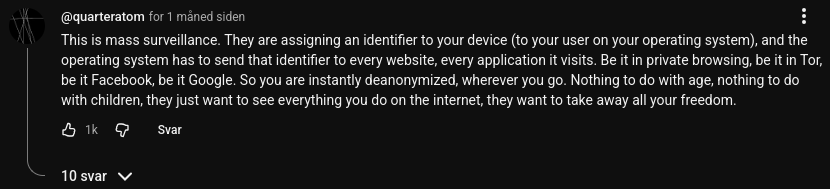
<p>Before I started writing this post, I thought I would rewatch the original Lunduke video in order to formulate my grievances with it. But to my surprise, I found no issues. The video was a mostly brief, informative overview of the law, with some level-headed commentary on his opposition to the law and on child safety online. So, where does the "insufferable" part of all of this come in? Cue the YouTube comment section:</p>
<figure><img src="/img/age-verification-comment1.png" alt="youtube comment one"></figure>
<figure><img src="/img/age-verification-comment2.png" alt="youtube comment two"></figure>
<figure><img src="/img/age-verification-comment3.png" alt="youtube comment three"></figure>
<figure><img src="/img/age-verification-comment4.png" alt="youtube comment four"><figcaption>All of these comments were in the top 10 most popular as of writing this.</figcaption></figure>
<p>If you have experienced the age verification discourse, you have probably seen your fair share of these kinds of comments. A bad law that threatens your anonymity online becomes "mass surveillance" with no relation to the stated intent. Nothing but an excuse to "see everything you do on the internet." In fact, this is the <strong>only</strong> perceivable explanation for such a law. We truly do not live in a free society. And then, as a chef’s kiss at the end, we are hit with the wise words of stickofephraim: "It sure seems like age verification is starting to get pushed at an accelerated rate. That’s no accident."</p>
<p>The 64 responses to this last comment really captures the mindset of these people. The whole chain talks about how "they" are taking your freedom away from you, and how this is only the beginning. Very rarely is "they" specified; the gamut ranges from politicians and big tech to Jews and elites.<sup id="fnref-2"><a href="#fn-2">2</a></sup> All of this is of course quite standard in the world of conspiracy theories, which has come to encompass so much of online discourse. This is probably one of the reasons that all of it annoys me so much; it all melts into the "culture wars" and becomes another layer of populist brain rot. All while being proclaimed in the most unimaginable smug way possible, making your average Redditor seem like a humble Buddha. Importantly, none of these comments have any value other than feeding the narratives and delusional worldviews of the commenters. All of the "rightful anger" only obscures the reality of how and why these laws are passed, making the real work of stopping these laws only more difficult.</p>
<p>If you want to understand what’s actually causing these laws to be proposed and passed, I recommend listening to <a href="https://pdst.fm/e/traffic.megaphone.fm/GLT2647415302.mp3?updated=1769699081">episode 495</a> of <em>The Rest is Politics</em>, starting from 25:17. Rory Stewart and Alistair Campbell, both mainstream political figures, interview two people from <a href="https://en.wikipedia.org/wiki/International_Justice_Mission">IJM</a>, an <a href="https://en.wikipedia.org/wiki/International_non-governmental_organization">INGO</a> working on combating child sexual exploitation. The stories of abuse, especially online abuse, that they tell are truly horrifying.</p>
<p>In the interview, the IJM workers lobby for their <a href="https://assets-sea.ijm.org/documents/Advocacy-Submissions/Relevant-Electronic-Services-and-Designated-Internet-Services-Industry-Standards-Submission.pdf?utm_source=chatgpt.com">proposal</a> of mandating all device manufacturers and operating systems to implement local scanning of all videos and photos (using AI) before they are uploaded anywhere, be it privately or publicly. If you are like me, this sounds like a privacy nightmare, and it would be a gross overstep of government power to create a law mandating this software. Rory and Alistair can’t understand why this was not implemented yesterday. Not because they are crooked politicians who want to control and spy on you, but because they are tech-illiterate boomers who want to protect children.</p>
<p>I’m not claiming all of these laws stem from mostly well-meaning NGOs and ignorant politicians. I have read about how Meta and other large social media platforms have tried to use age verification laws to shift regulatory burdens away from their own platforms. The fact that the point of access for programs is a persistent age API is also suspiciously convenient for those who are in the business of collecting data and selling it. All of this is concerning, but the argument that they put forward to the politicians will be one of child safety, not "Hey, I want to know all of my users’ age so I can sell their data for more profit!"</p>
<p>Politicians have a tough gig in this case. They are not domain experts on the internet or user privacy, and they don’t want to be seen as the ones mounting pushback against protecting children. I say this not to defend their actions; I think we should expect our representatives to educate themselves to some level on what they vote for, outside of what some lobbying group teaches them. I say this because correctly identifying the problem is the first step to finding a solution. Once you realize that the politicians are not guided by a lust for control or lobbying bribes, you might start doing less soy posting online and start making more calls to your representatives and sharing your view.<sup id="fnref-3"><a href="#fn-3">3</a></sup> It probably won’t make any difference, but I can guarantee that it will make more of a difference than posting comments under a Lunduke video or karma farming on Reddit.</p>
<ol class="footnotes">
<li id="fn-1">The "slop" meme has become way too widespread, but I think it's used appropriately here.<a href="#fnref-1">↩</a></li>
<li id="fn-2">Here's one of these replies to the original comment that I quite enjoyed: "It has to do with certain views of a certain genocidal ethnostate heavily tied to the United States and Jeffrey Epstein believing that Americans have too much freedom of speech for their liking."<a href="#fnref-2">↩</a></li>
<li id="fn-3">An important caveat for this entiry post is that I am talking in the context of a liberal democratic government. The incentives and mechanisms of an authoritarian state are different.<a href="#fnref-3">↩</a></li>
</ol>]]></content>
</entry>
<entry>
<title>Hands-On Unix Philosophy</title>
<id>https://jhhm.no/writings/hands-on-unix-philosophy</id>
<link rel="alternate" href="https://jhhm.no/writings/hands-on-unix-philosophy"/>
<published>2026-03-10T11:29:22Z</published>
<updated>2026-03-10T11:29:22Z</updated>
<content type="html"><![CDATA[<h1>Hands-On Unix Philosophy</h1>
<p>I sometimes find myself in a position of trying to explain to someone why I use the software that I do. Two common examples are Linux and "all those text programs". These questions might come from a curious person who has no idea what Unix or a terminal is, or from a technically savvy person who thinks people who use the terminal are hipsters trying to impress themselves. In this post I will defend my choice of software by quickly explaining the Unix philosophy and demonstrating it through a practical example.</p>
<h2>The Philosophy</h2>
<p>I won't wade too deep in my explanation of the Unix philosophy. There are countless other, better resources on the internet available for anyone who wants a deeper understanding. But for those who only want to dip their toes in the water, here is the gist of it.</p>
<p>Programs are more useful when they are simple, small in scope, and allow for easy interoperability with other programs. Simple programs are good because they have fewer bugs, are easier to maintain, and probably won't become resource-hungry behemoths. This goes hand in hand with being small in scope. Programs that have a small, well-defined function are easier to reason about,thus making them easier to use. The last piece of the puzzle is where the magic happens: connecting these small programs. <a href="https://www.cs.dartmouth.edu/~doug/">Malcolm Douglas McIlroy</a> of Unix heritage elegantly captured this idea when he said:</p>
<blockquote>
This is the Unix philosophy: Write programs that do one thing and do it well. Write programs to work together. Write programs to handle text streams, because that is a universal interface.
</blockquote>
<p>"Do one thing and do it well" is perhaps the phrase most associated with the Unix philosophy. I like it because it implies the existence of software that does a lot of things poorly, which sure seems to describe a lot of software.<sup id="fnref-1"><a href="#fn-1">1</a></sup></p>
<h2>Practical Example</h2>
<p>The other day I found myself doing a repetitive task I had done hundreds of times before. I came across a script that used an option flag that I was unfamiliar with, and started wondering what it did. I used the program <strong>man</strong>, which shows the manual page for a program<sup id="fnref-2"><a href="#fn-2">2</a></sup>, and searched for the unfamiliar option flag and read about it. This is a trivial operation, easily done in a couple of seconds, yet it can be surprisingly frustrating at times. Certain options are often referenced before their own section, or are a substring of another option, so finding it can involve pressing <code>n</code> multiple times before reaching the correct place.</p>
<p>My go-to solution for these small inconveniences is usually to just go about my day. Then it happens again, and I think, "I have been here before," and then it happens again and again, until eventually I make a mental note that I could improve my experience. For a problem as trivial as this one, I also know immediately what the solution is. I want to make a program that takes a program and an option and prints the section of the manual describing that option.</p>
<p>On a Unix-y operating system, writing a script that does this is fairly trivial. All we need are two small programs, one that prints the entire manual, and one that filters it. The first program has already been mentioned, <strong>man</strong>, which prints the manual page in plain text formatting.<sup id="fnref-3"><a href="#fn-3">3</a></sup> The next program should read this output (a text stream) and filter it the way we want. I chose <strong>awk</strong> for this task, which allows you to take text input and transform it in various ways by filtering and rearranging it into a new text. The resulting shell script ended up looking like this:</p>
<pre><code>
#!/bin/sh

set -eu

[ "$#" -ne 2 ] &amp;&amp; echo "usage: ${0##*/} PAGE OPT" &gt;&amp;2 &amp;&amp; exit 1

man "$1" | awk -v opt="$2" '
  /^[[:space:]]*-/ {
    hit = ($0 ~ "(^|[ ,])" opt "([ ,=[]|$)")
  }
  hit
'
</code></pre>
<p>There is some extra fluff before the core functionality of the script, which I will go over in detail in the next part. The important part, however, is that by taking two programs, both using plaintext as their interoperable interface, we have created a new program which solves the problem. By spending 15 minutes writing a script, I have been able to improve my workflow, saving me a bit of time, and more importantly, the cognitive effort of manually scanning the page for the correct section.</p>
<p>Importantly, I would argue that this could not have been done as elegantly or easily using other programs that do not follow the Unix philosophy. Perhaps this use case is common enough that a fully fledged manual viewer would include it, but for more niche use cases, that might not be true. One thing that I know my new program has an edge over the theoretical manual viewer is that it outputs a text steam, which makes it extendable just like <strong>man</strong> and <strong>awk</strong>.</p>
<h2>Script Specifics</h2>
<p>For those interested, I wanted to write about some of the decisions I made when writing the script (I call it <strong>boy</strong>; get it?) Here’s a line-by-line explanation of the script:</p>
<pre><code>
#!/bin/sh
</code></pre>
<p>I try to write most, if not all of my scripts in POSIX compliant shell for portability and simplicity sake. This is fairly trivial in small scripts like this, which don't require much from the shell other than running programs.</p>
<p>A simple <code>/bin/sh</code> shebang is preferable to <code>/usr/bin/env sh</code> for POSIX scripts, since <code>/bin/sh</code> is already mandated by POSIX. Adding another dependency via <strong>env</strong> would therefore be unnecessary, and if the system's <code>/bin/sh</code> either does not exist or is not POSIX-compliant, there are larger problems afoot.</p>
<pre><code>
set -eu
</code></pre>
<p>Setting exit on error (<code>-e</code>) and unset variables (<code>-u</code>) is usually a good practice, although in this specific script neither will do much. The only program that can realistically fail is <strong>man</strong>, but <code>-e</code> does not protect against failure in pipes, so the script won't exit if <strong>man</strong> fails. We are also checking for required arguments in the next line, so <code>-u</code> will not catch any usage of unset variables. I've included them mainly in case I make edits to the script in the future, and as I mentioned, it is good practice.</p>
<pre><code>
[ "$#" -ne 2 ] &amp;&amp; echo "usage: ${0##*/} PAGE OPT" &gt;&amp;2 &amp;&amp; exit 1
</code></pre>
<p>This line checks if the correct amount of arguments is given to the program (2 in this case). If it is not 2, the usage message will be printed to stderr, and the program will exit with status code 1, indicating an error. I try to include a usage message in most of my scripts, as it provides helpful documentation for the future. The <code>${0##*/}</code> part is a useful shell syntax called pattern removal, which removes everything up to and including the last <code>/</code> in the <code>$0</code> variable. This is an alternative to using the <strong>basename</strong> command, e.g, <code>$(basename "$0")</code>.</p>
<pre><code>
man "$1" | awk -v opt="$2" '
  /^[[:space:]]*-/ {
    hit = ($0 ~ "(^|[ ,])" opt "([ ,=[]|$)")
  }
  hit
'
</code></pre>
<p>This line is the main part of the script. It runs the <strong>man</strong> command, and pipes the output into <strong>awk</strong>, which is passed the second argument as <code>opt</code>. The awk script can look intimidating if you’re not familiar with awk or regular expressions, but I will try to explain it without getting bogged down in language-specific syntax.<sup id="fnref-4"><a href="#fn-4">4</a></sup> The script can be read as follows: for every line, if the line starts with whitespace followed by a <em>-</em>, check if <code>opt</code> appears as a word in that line. If that is true, <code>hit</code> is set to true, and if <code>hit</code> is true, the line is printed.</p>
<p>Summarized, the logic basically sets hit to true if the section corresponds to the given <code>opt</code>, and sets <code>hit</code> to false when the section is not for <code>opt</code>. It then prints the line if hit is true.</p>
<p>An unintended side effect of this script is that it allows for regular expressions in the <code>opt</code> input via <strong>awk</strong>, e.g.:</p>
<pre><code>
$ boy ls '--time.*'
     --time=WORD
            select  which  timestamp  used to display or sort; access time (-u): atime, access, use; metadata change time (-c):
            ctime, status; modified time (default): mtime, modification; birth time: birth, creation; with -l, WORD  determines
            which time to show; with --sort=time, sort by WORD (newest first)

     --time-style=TIME_STYLE
            time/date format with -l; see TIME_STYLE below

     -t     sort by time, newest first; see --time
</code></pre>
<p>As a last aside, I am sure that there exists some edge cases that this script will not handle correctly. Man pages can be formatted in all sorts of different ways, and there is no standard for how options should be documented. Still, it has worked perfectly for every man page I have tried it on.</p>
<ol class="footnotes">
<li id="fn-1">I am sometimes "forced" to use Microsoft Teams for university collaborations. It has mediocre file sharing, poor document editing, and frustrating formatting in Microsoft Word, all while being so horribly slow that it takes 20 seconds to launch, and stresses my CPU cores just trying to open a folder.<a href="#fnref-1">↩</a></li>
<li id="fn-2">In a hidden example of the Unix philosophy, <strong>man</strong> does not actually display the manual page in a scrollable, searchable interface. It simply prints the contents of the man page and hands it off to another program, in most cases <strong>less</strong>, which provides an interactive interface to the wall of text.<a href="#fnref-2">↩</a></li>
<li id="fn-3">The term "plain text" hides a lot of assumptions, which can lead to a lot of harmful consequences. <a href="https://www.youtube.com/watch?v=_mZBa3sqTrI">Here</a> is an entertaining talk all about it. Luckily for our purposes we can be quite naïve, and just assume that text is text.<a href="#fnref-3">↩</a></li>
<li id="fn-4">For a nice introduction to awk, I recommend <a href="https://www.grymoire.com/Unix/Awk.html">this</a> old tutorial / introduction. Some of it might be a bit dated, but I think you are better off knowing some of the old idiosyncrasies/intricacies of the Unix world.<a href="#fnref-4">↩</a></li>
</ol>]]></content>
</entry>
<entry>
<title>A Year With the Thinkpad x201t</title>
<id>https://jhhm.no/writings/year-with-x201t</id>
<link rel="alternate" href="https://jhhm.no/writings/year-with-x201t"/>
<published>2026-02-20T00:27:46Z</published>
<updated>2026-02-20T00:27:46Z</updated>
<content type="html"><![CDATA[<h1>A Year with the Thinkpad x201t</h1>
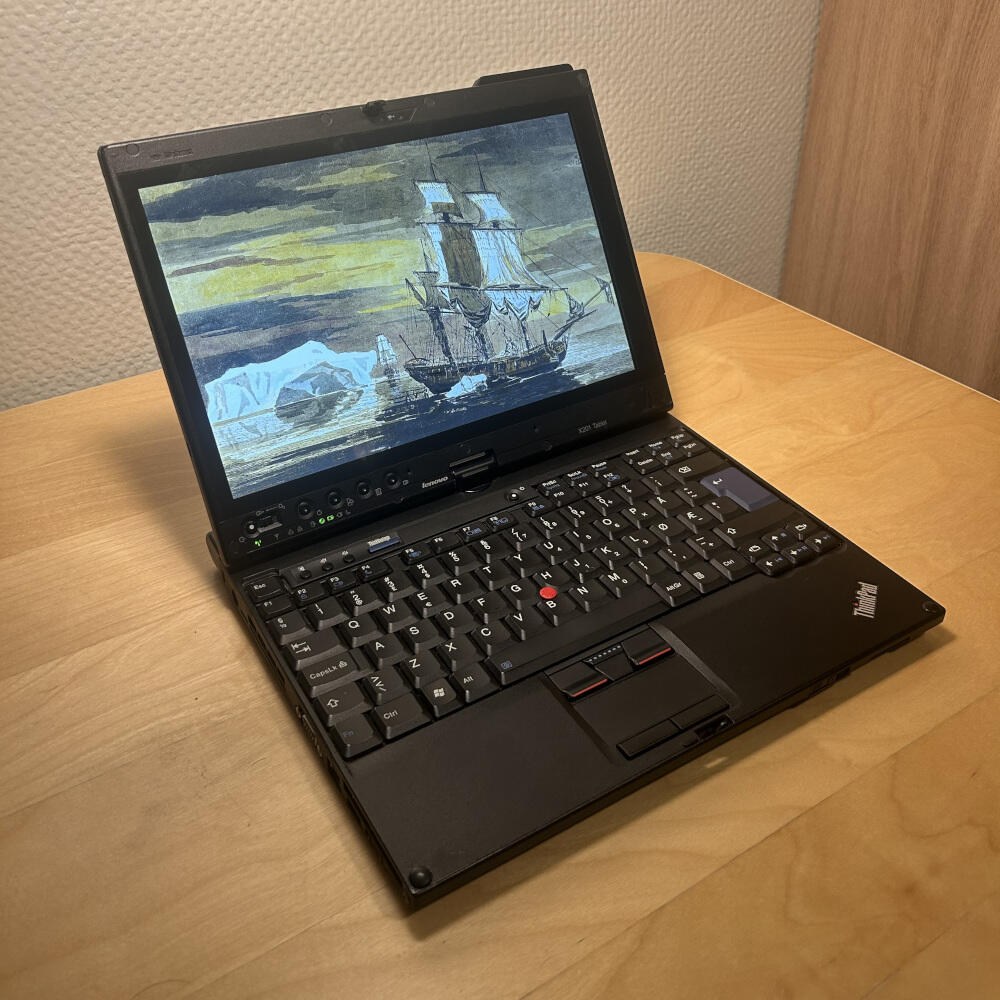
<figure><img src="/img/x201t-main.jpg" alt="tilted"></figure>
<p>As of writing this it has been exactly 1 year since i bought my x201t, and i have been using it as my main<sup id="fnref-1"><a href="#fn-1">1</a></sup> laptop for the past 10 months. I thought that it might be interesting to write down my experience with the now almost 15 year old machine, and my motivations for using it.</p>
<h2>Backstory</h2>
<p>I became fascinated by older Thinkpad models a few years back for all of the reasons most people do. Their reliability, sturdiness, keyboard, Linux support, and price all drew me in to the point where I now own a small collection of them. I have mixed feelings about owning machines that I have no real use for, but I take some comfort in knowing that there are worse consumerist urges then buying cheap second-hand laptops.</p>
<p>Exactly why I ended up using the x201t was partly the result of methodical reasoning, but mostly chance. I already owned and was using an x220, but I had an irresistible itch for something more. Although there was nothing wrong with the x220, I had recently discovered the world of convertible two-in-one Thinkpad tablets. When a high-end x201t appeared as a new listing on finn.no<sup id="fnref-2"><a href="#fn-2">2</a></sup>, I knew I had to have it.</p>
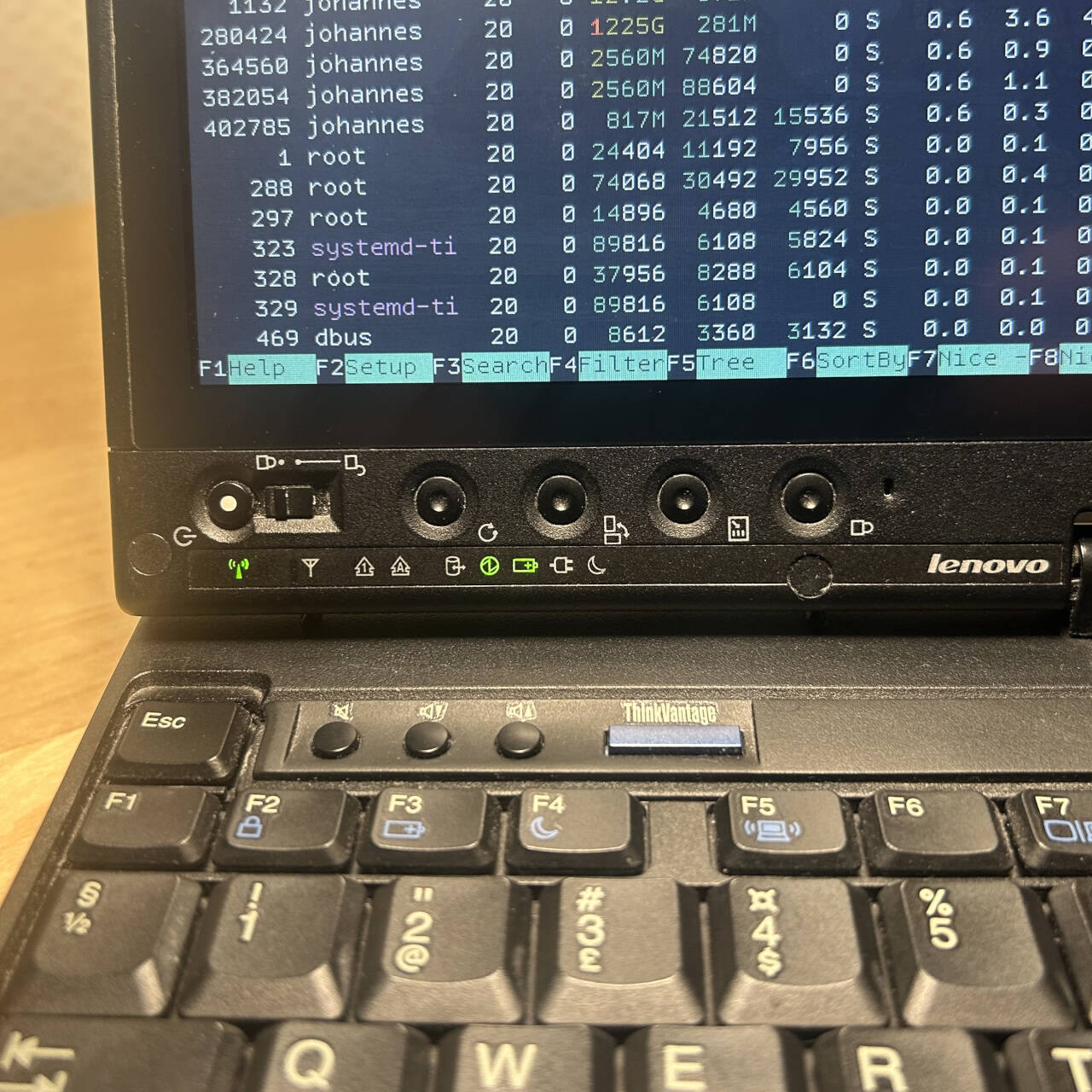
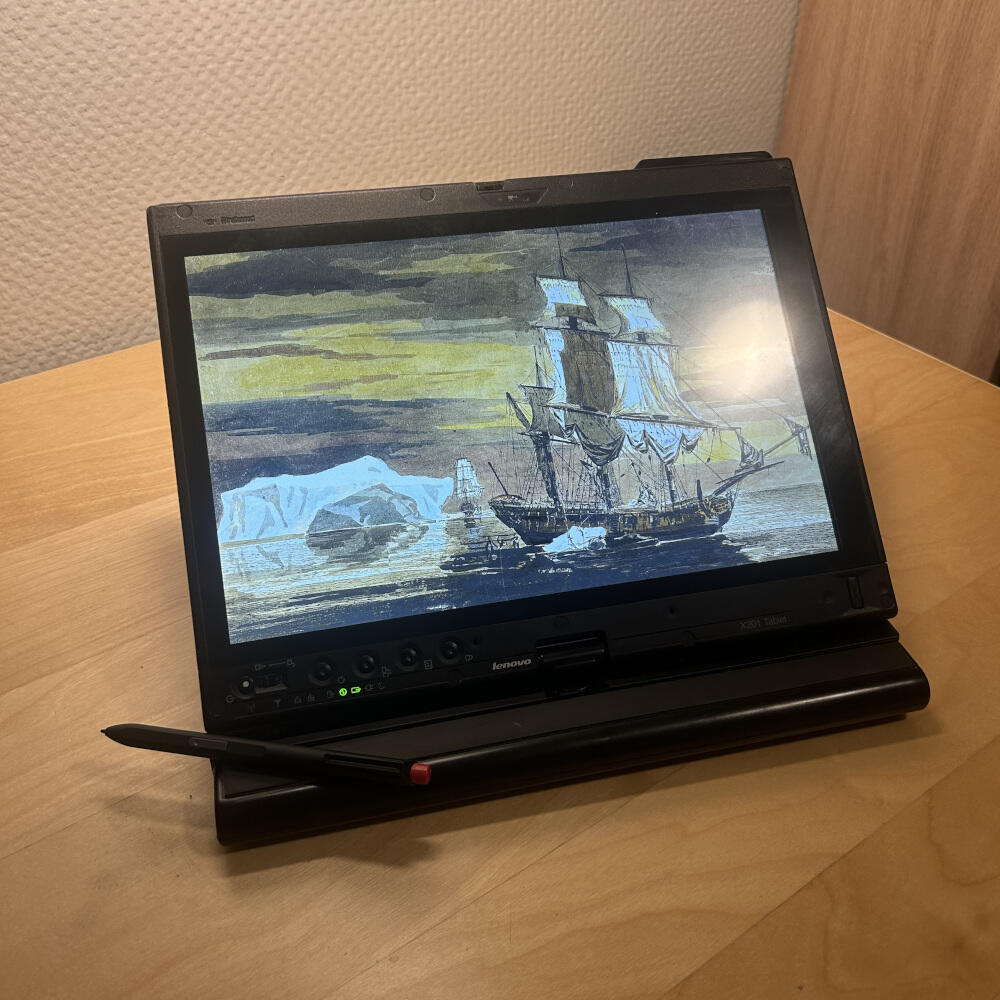
<p>I now consider the x201t, in some ways, to be the pinnacle of Thinkpad convertibles. It features a 16:10 aspect ratio screen, a display latch, a whopping five buttons on the display assembly, and a full collection of indicator LEDs. These are all features that the later x220t and x230t lack, to their detriment. Those later models do have their own strengths however: they can be equipped with 16GB of RAM, double that of the x201t, and offer more modern ports such as DisplayPort, USB-3, and mSATA, along with newer-generation CPUs. If you do have a choice between these three models, I believe these are the distinguishing factors, and if you are like me then the retro features of the older model wins out. I later ended up buying an x230t, and these feelings only grew stronger while owning both machines. The x230t sits on a shelf now, and has probably began it's new life as a dust magnet.</p>
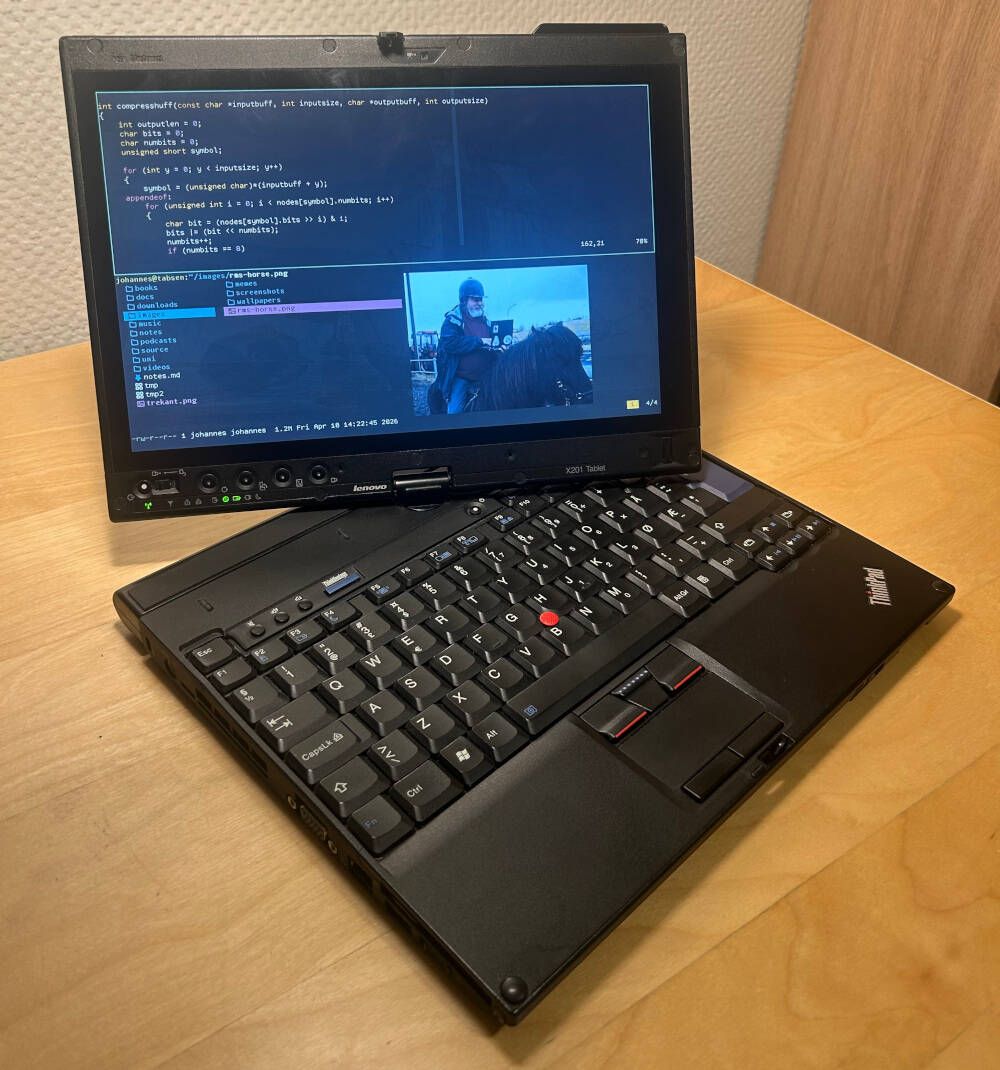
<figure><img src="/img/x201t-tilt.jpg" alt="tilted"><figcaption>Obligatory image of the screen tilted to the side. I may have found this ability useful once or twice. Maybe.</figcaption></figure>
<h2>Hardware</h2>
<ul>
<li>CPU: Intel(R) Core(TM) i7 CPU L 640 @ 2.13GHz</li>
<li>RAM: 8GB DDR3 1334 MT/s</li>
<li>STORAGE: 128GB Intel SSD</li>
<li>DISPLAY: 12.1" 1280x800, 400 nits</li>
</ul>
<p>When i first started using the x201t I knew that the main drawback of the machine would be it's aging hardware. I am by no means under the destructive<sup id="fnref-3"><a href="#fn-3">3</a></sup> delusion that any computer older then 5 years needs to be replaced by the latest and greatest, but the 15 year old hardware does show it's age, especially on the bloated web. That being said, it has performed admirably on most other tasks that i threw at it, in no small part due to my choice of software, but more on that later.</p>
<p>The only upgrades that i did for the hardware was upgrading to 8GB of RAM from 4GB, and giving it some new thermal paste<sup id="fnref-4"><a href="#fn-4">4</a></sup>. The CPU hovers around 45-50°C during light workloads, and goes to around 65-75°C when streaming videos. This is a bit hot for my liking, but the fan never gets too loud, so it is something I can deal with. I might have to upgrade the drive to something larger as it fills up, but the old SSD has been snappy enough for me.</p>
<p>The battery that came with the machine lasted roughly 1.5-2.5 hours during medium workloads, which was not too bad, but not great either. Other then the old hardware, the battery life will always be a weak point of these older machines, and you can be happy to get around 3 hours of battery life. I ended up buying a replacement battery from China, which holds a charge for maybe 1 hour longer. Not great, not terrible.</p>
<p>I have already laid out some of the killer-features of the x201t compared to it's successors, and here are the reasons why they are killer-features. The 16:10 aspect ratio is great for most tasks, whether reading, programming or just surfing the web. I often have two windows open, stacked on top of each other, and the extra vertical space makes both programs comfortably usable.  Perhaps the greatest testament to the taller aspect ratio is that I immediately notice, and miss it when I use a computer without it.</p>
<figure><img src="/img/x201t-indicators.jpg" alt="indicators"><figcaption>The X201 was the last X-series ThinkPad with all the indicator lights. I rarely use them, but I like the aesthetic.</figcaption></figure>
<p>The display itself on my x201t is quite nice, much better then the standard TN displays most Thinkpads of the era came equipped with. It only has a resolution of 1280x800, but on such a small screen it is completely fine, especially since the hardware would struggle streaming 1080p videos anyways. I am no expert in display technology, but I do notice the black levels being quite shallow, and it has a overall more washed-out appearance then some nicer, more modern displays i have seen. It can get quite bright, and I find it pleasant to use even when outside in direct sunlight.</p>
<p>The display latch is one retro feature that I don't particularly miss when using the x220, and i don't particularly love it on the t420, but I consider it almost a must-have for the tablet models. I've found that the single-hinge design of the tablet models can make them a bit more flimsy, so being able to lock the display down when carrying it in a backpack, or when in tablet mode is a nice feature. My x230t came with a loose hinge, and the replacement hinge I bought online was just as lose, so a display latch would have been a significant improvement to it's usefulness.</p>
<p>The classic 7-row Thinkpad keyboard is probably the main reason i stick to using these old machines. The typing experience is better then any other laptop keyboard i have ever used, and i even prefer it to my mechanical keyboard at times. The laptop came with a US ANSI layout, which I eventually switched out for a Danish<sup id="fnref-5"><a href="#fn-5">5</a></sup> ISO keyboard, which I am more used to. The x201t has a slightly different layout then the later xx20 models. Most noticeably the escape key is smaller, and the keys have a more "rounded" feel to them. I have a slight preference for the newer type, but I do like the mushy volume and power buttons on the old ones. In addition to the keyboard buttons, there are five additional buttons on the top display assembly, which can also be used in tablet mode. Of these buttons I only use the two rotation buttons (only one is needed), and the lock button. I do not use the second power button, and I never bound the last "toolbox" button to anything.</p>
<figure><img src="/img/x201t-tab.jpg" alt="tablet"></figure>
<p>This might be a good time to address the main draw of the x201t, the tablet functionality. The x201t comes equipped with a Wacom touch screen (mine only supports pen touch, though other models also support finger-touch), and it has the ability to transform into tablet mode with the unique single-hinge design. The reality is that i rarely ever use the touch functionality, since i prefer typing out notes and I don't do any drawing. I have used it on rare occasions for hand-drawn diagrams, and it has come in handy a couple of times when I need to make some sketches. My main takeaway is that the tablet functionality is not a big win for me, and I will probably not value it highly when i choose my next laptop.</p>
<p>Last, but not least, the tablet Thinkpads don't some equipped with a Thinklight. I didn't think that this would be an issue for me, but I have noticed it's absence several times, and I have never quite gotten used to not having one. I have found myself increasing the brightness of the screen, or angling the screen downwards in order to light up the keyboard at times.</p>
<h2>Software</h2>
<p>Since using the x201t my choice of software has been in a turbulent state, so i will avoid going into too many details. The most important choices are to avoid Windows, and any other overly complex, bloated software. I have been using Arch Linux, with <a href="https://codeberg.org/dwl/dwl">dwl</a> as my wayland compositor for the past year. I am not quite content with my setup, but I doubt it will change much in the near future<sup id="fnref-6"><a href="#fn-6">6</a></sup>. The next important piece of software is the terminal, which has been <a href="https://codeberg.org/dnkl/foot">foot</a> for me the past year. It is lightweight, and has all of the features i want and need in a terminal. It also has the ability of being run in a server client mode, which decreases the already tiny startup time to be instantaneous, and saves on system resources.</p>
<p>When it comes to web browsers I have been using <a href="https://www.qutebrowser.org/">Qutebrowser</a> as my main browser, and Firefox when necessary. Both are large and slow, but the modern web basically necessitates it. The rest of my graphical programs are all fairly standard Linux stuff: <a href="https://www.gimp.org/">GIMP</a>, <a href="https://mpv.io/">mpv</a>, <a href="https://pwmt.org/projects/zathura/">zathura</a>. They all run fine, although all of them will sometimes slow down when handling certain large files.</p>
<h2>Conclusion</h2>
<p>I have grown to love the x201t over the last year of use. One aspect of the laptop that might not have come through in this write-up is just how beautiful the laptop is. In a world full of matt anodized aluminum MacBook lookalikes, the retro look and feel of the x201t really shines through. It has flashing indicator lights, a bump for the antenna, a comically tiny touchpad, and it's signature swivelling hinge. All of these features make it a fun laptop to use, and it inspires me to get my work done using it. It has become my favorite Thinkpad by far, and i hope that it can continue to server my needs in the future.</p>
<ol class="footnotes">
<li id="fn-1">Ideally I would like to only use one laptop, but I am required to use a modern windows laptop when taking exams from my university. I also tinker with other machines on a semi-consistent basis, but i do not use them outside of this tinkering.<a href="#fnref-1">↩</a></li>
<li id="fn-2">Finn.no is a Norwegian equivalent to eBay or Facebook marketplace.<a href="#fnref-2">↩</a></li>
<li id="fn-3">Destructive to the mind, wallet and planet. Most of us consume too much of most things, electronics only being one of these things.<a href="#fnref-3">↩</a></li>
<li id="fn-4">The tablet Thinkpads are probably some of the least fun Thinkpads to re-paste. It requires a full disassembly, and the thin top covers can be tricky to remove without breaking something. Luckily this operation is rarely needed, and most other components like RAM and storage are just a couple of screws away.<a href="#fnref-4">↩</a></li>
<li id="fn-5">I could not find a Norwegian keyboard, so I ended up settling for a Danish one, and swapping the Ø and Æ letters to their proper places.<a href="#fnref-5">↩</a></li>
<li id="fn-6">Once River 0.4 releases I think I will give it a shot, since dwl seems to be in a stagnant rut in an ever-changing wayland world. I have also started exploring other operating systems, namely the BSDs and Alpine Linux, but I have yet to take the leap from my familiar Arch Linux.<a href="#fnref-6">↩</a></li>
</ol>]]></content>
</entry>
</feed>